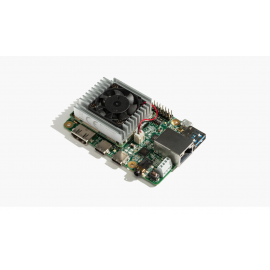
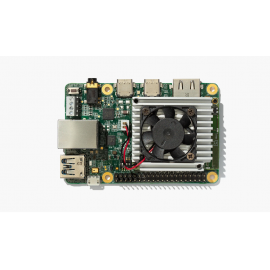
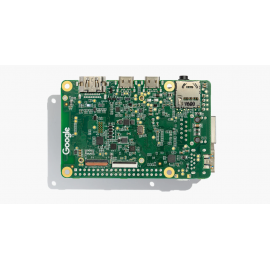
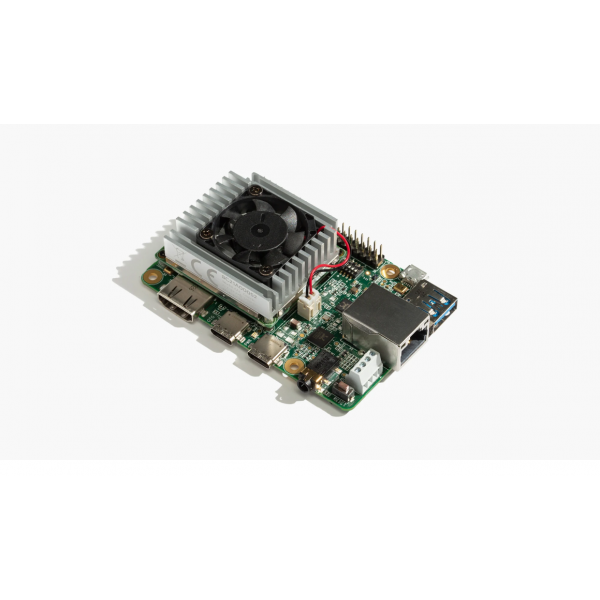
Google Coral Dev Board - Edge TPU AI Development Board with 4 TOPS
Bring powerful on-device machine learning to your projects with the Google Coral Dev Board. This single-board computer features the revolutionary Google Edge TPU coprocessor delivering 4 trillion operations per second (4 TOPS) at just 2 watts. Built on the NXP i.MX 8M quad-core ARM processor, it combines exceptional ML inferencing performance with a complete Linux system running Mendel (Debian derivative).
4 TOPS Edge TPU Power - Run AI at the Edge
The Google Edge TPU coprocessor executes state-of-the-art mobile vision models like MobileNet v2 at almost 400 FPS with ultra-low power consumption. Perfect for computer vision, object detection, image classification, and real-time AI applications.
Key Features
Powerful Edge TPU ML Accelerator
- 4 TOPS Performance - 4 trillion operations per second
- Power Efficient - 2 TOPS per watt (0.5W per TOPS)
- Fast Inferencing - MobileNet v2 at 400 FPS
- TensorFlow Lite - Optimized for TFLite models
Complete Computing System
- NXP i.MX 8M SoC - Quad-core ARM Cortex-A53 at 1.5 GHz plus Cortex-M4F
- 1 GB or 4 GB LPDDR4 RAM - Fast memory for demanding tasks
- 8 GB or 16 GB eMMC - Onboard flash storage
- Vivante GC7000Lite GPU - 32 GFLOPs graphics processing
Wireless Connectivity
- Wi-Fi 2x2 MIMO - Dual-band 2.4/5 GHz (802.11a/b/g/n/ac)
- Bluetooth 4.2 - With BLE support
- Gigabit Ethernet - Fast wired networking
Rich I/O and Connectivity
- USB 3.0 Ports - Type-C OTG and Type-A host
- HDMI 2.0a Output - Full-size, up to 1080p
- MIPI CSI-2 Camera - 4-lane camera interface
- MIPI DSI Display - 4-lane display interface
- 40-pin GPIO Header - Expansion for sensors and peripherals
Technical Specifications
| Edge TPU ML Accelerator |
| AI Performance |
4 TOPS (Trillion Operations Per Second) |
| Power Efficiency |
2 TOPS per watt (0.5W per TOPS) |
| Example Performance |
MobileNet v2 at 400 FPS |
| Supported Frameworks |
TensorFlow Lite |
| Main Processor (NXP i.MX 8M) |
| CPU |
Quad-core ARM Cortex-A53 at 1.5 GHz |
| Co-Processor |
ARM Cortex-M4F |
| GPU |
Vivante GC7000Lite (32 GFLOPs, OpenGL ES 3.1, Vulkan) |
| VPU |
4Kp60 HEVC/H.265, VP9 decoder |
| Memory & Storage |
| RAM |
1 GB or 4 GB LPDDR4 (1600 MHz) |
| eMMC Storage |
8 GB or 16 GB NAND flash (eMMC 5.0) |
| MicroSD Slot |
Yes (expandable storage, bootable) |
| Wireless Connectivity |
| Wi-Fi |
2x2 MIMO (802.11a/b/g/n/ac 2.4/5 GHz) |
| Bluetooth |
4.2 with BLE support |
| Ethernet |
Gigabit Ethernet (10/100/1000 Mbps) |
| Video & Display |
| HDMI |
Full-size HDMI 2.0a (up to 1080p) |
| MIPI DSI |
4-lane display interface (up to 1920x1080 at 60 Hz) |
| MIPI CSI-2 |
4-lane camera interface (for Coral Camera) |
| USB Ports |
| USB Type-C OTG |
USB 3.0 for data (device mode) |
| USB Type-A Host |
USB 3.0 with power output |
| USB Micro-B |
USB 2.0 for serial console |
| USB Type-C Power |
5V DC, 2-3A power input |
| Audio |
| Audio Jack |
3.5mm CTIA compliant (headphone out) |
| Microphones |
2x Digital PDM microphones |
| Speaker Output |
4-pin 2.54mm terminal for stereo speakers |
| I/O & Expansion |
| GPIO Header |
40-pin expansion header (3.3V logic) |
| Interfaces Available |
UART, I2C, SPI, PWM, SAI (I2S) |
| System & Software |
| Operating System |
Mendel Linux (Debian derivative) |
| Boot Options |
eMMC, MicroSD card, USB |
| Security |
Cryptographic coprocessor (ATECC608A), ARM TrustZone, HAB |
| Physical |
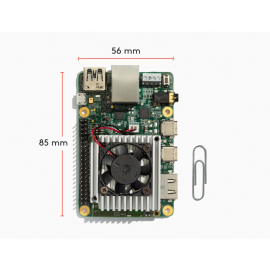
| Dimensions |
88 x 60 mm (board), SoM: 40 x 48 mm |
| Operating Temperature |
0 to 50 degrees C |
| Power Requirements |
5V DC, 2-3A via USB Type-C |
System-on-Module (SoM) Design
The Coral Dev Board features a removable System-on-Module (SoM) containing all the core components:
- NXP i.MX 8M SoC - Complete processor system
- Google Edge TPU - ML accelerator coprocessor
- Memory & Storage - LPDDR4 RAM and eMMC flash
- Wireless - Wi-Fi and Bluetooth radios
- Security - Cryptographic coprocessor
This modular design allows you to:
- Prototype on Dev Board - Use full baseboard features during development
- Scale to Production - Remove SoM and integrate into custom PCB
- Reduce Development Time - Complete system in compact module
Edge TPU Performance Examples
| Model |
Task |
Performance |
| MobileNet v2 |
Image Classification |
400 FPS |
| SSD MobileNet v2 |
Object Detection |
100+ FPS |
| DeepLab v3 |
Image Segmentation |
50+ FPS |
| PoseNet |
Pose Estimation |
60+ FPS |
Perfect For AI Applications
Computer Vision
Real-time object detection, classification, tracking, and analysis
Smart Security
Face recognition, intrusion detection, activity monitoring
Industrial Automation
Quality control, defect detection, process monitoring
Robotics
Vision-guided navigation, object manipulation, obstacle avoidance
Smart Home / IoT
Voice recognition, gesture control, occupancy sensing
Retail Analytics
People counting, customer behavior, inventory monitoring
40-Pin GPIO Header
The Dev Board includes a standard 40-pin GPIO header providing access to:
- UART - 2 channels for serial communication
- I2C - 2 channels for sensors and peripherals
- SPI - 2 channels for high-speed devices
- PWM - 3 channels for motor control, LEDs
- SAI (I2S) - Audio interface
- GPIO - 16 general purpose I/O pins
- Power Rails - 3.3V and 5V
All GPIO pins operate at 3.3V logic with programmable impedance.
What's Included
| Dev Board |
1x Coral Dev Board with SoM installed |
| Cooling |
Heat sink and 5V fan (pre-installed) |
| Accessories |
Quick start guide, safety information |
What You Need (Sold Separately)
Required - NOT Included
- USB Type-C Power Adapter - 5V DC, 2-3A (15W)
- HDMI Monitor - For initial setup
- USB Keyboard & Mouse - For initial setup
- Internet Connection - Wi-Fi or Ethernet cable
Important Information
Mendel Linux Operating System
The Dev Board runs Mendel Linux, a Debian-based operating system optimized for Edge TPU:
- Full Linux environment with standard tools
- Python 3 with TensorFlow Lite runtime
- PyCoral API for Edge TPU inferencing
- Weston Wayland compositor for graphics
- SSH and serial console access
TensorFlow Lite Models Required
The Edge TPU runs TensorFlow Lite models compiled with the Edge TPU Compiler. Pre-trained models available at coral.ai/models. You can also train custom models using TensorFlow, PyTorch, or AutoML Vision Edge.
Heat Sink Safety
Caution: The heat sink can become very hot during operation (even when fan is running). Avoid touching the heat sink during or immediately after use to prevent burn injuries. Always power down the board before handling.
Available SKUs
| SKU |
RAM |
eMMC Storage |
Best For |
| 1 GB Version |
1 GB LPDDR4 |
8 GB |
Learning, prototyping, single model inference |
| 4 GB Version |
4 GB LPDDR4 |
16 GB |
Production, complex applications, multiple models |
Getting Started
Quick Start Steps
- Flash Mendel Linux to the board (via USB or SD card)
- Connect HDMI monitor, USB keyboard/mouse
- Power on with USB Type-C (5V, 2-3A)
- Complete initial setup and Wi-Fi configuration
- Install PyCoral library and TensorFlow Lite runtime
- Download pre-trained models or compile your own
- Run inference demos and examples
Complete documentation available at coral.ai/docs
Development Tools
- Mendel Development Tool (MDT) - Command-line tool for board management
- Edge TPU Compiler - Converts TFLite models for Edge TPU
- PyCoral API - Python library for inferencing
- AutoML Vision Edge - No-code model training
- TensorFlow Lite - Convert TensorFlow models
Frequently Asked Questions
Q: What's the difference between 1 GB and 4 GB versions?
A: 4 GB version has more RAM (4 GB vs 1 GB) and storage (16 GB vs 8 GB). Choose 4 GB for production, complex apps, or running multiple models. 1 GB is fine for learning and single-model prototypes.
Q: Can I run regular TensorFlow models?
A: The Edge TPU runs TensorFlow Lite models that have been compiled with the Edge TPU Compiler. You can convert TensorFlow models to TFLite format, then compile for Edge TPU.
Q: What cameras work with the Dev Board?
A: The official Coral Camera connects via MIPI CSI-2. You can also use USB cameras with the USB ports.
Q: Can I use the SoM in my own product?
A: Yes! The SoM is designed to be removed from the baseboard and integrated into custom PCB designs. See the SoM datasheet at coral.ai for details.
Q: What power supply do I need?
A: Use a USB Type-C power adapter providing 5V DC at 2-3A (10-15W). Do NOT power from a computer USB port.
Q: Does it support Python?
A: Yes. Mendel Linux includes Python 3 with the PyCoral library for Edge TPU inferencing.
Q: Can I train models on the Dev Board?
A: The Edge TPU is optimized for inference, not training. Train models on a PC/cloud using TensorFlow, then deploy compiled models to the Dev Board.
Why Buy from CrazyPi.com?
- Genuine Google Coral Product - Official board with warranty
- Expert ML Support - Technical assistance for AI projects
- Fast Shipping - Quick delivery across India
- Complete Ecosystem - Cameras, accessories, add-ons available
- Documentation & Examples - Get started quickly with resources
Technical Resources
- Official Documentation - coral.ai/docs
- Pre-trained Models - coral.ai/models
- Code Examples - github.com/google-coral
- Getting Started Guide - Complete setup instructions
- Edge TPU Compiler - Model compilation tool
4 TOPS of Edge AI Power - Deploy ML at the Edge
Buy Google Coral Dev Board at CrazyPi.com - India's source for Edge AI development boards.